Use case
Data engineering teams on Databricks test pipelines in development workspaces that are often fed in one of two ways: a scheduled clone of production tables, or a few hand-made CSV files that nobody maintains. The first copies personal data into a place with many more readers; the second exercises none of the real joins. A middle path for pipeline development is a synthetic dataset with the shape of a real domain — several related tables, realistic value ranges, rare cases — loaded into a catalog that only holds test data.
The scenario
A team building order analytics needs shopper, cart, order, payment, return and shipment tables in a development catalog. The tables must have explicit types (no schema inference surprises), the load must be repeatable, and the data must be clearly synthetic so that it can be shared with contractors and used in notebooks without a data-protection review for every new reader.
The Retail and E-commerce pack publishes its entity model as schema/entities.json and its synthetic tables as CSV, JSON and Parquet. The script below maps the portable column types to Databricks SQL types, checks that every CSV header matches its table definition, writes the full load script to databricks_load.sql and prints a summary with one table as an example.
Run it
Python 3.10 or later, standard library only. It writes one file in the current directory.
import json
import os
import re
import urllib.request
from collections import Counter

BASE = os.environ.get("DATANIVRA_DOWNLOADS", "https://www.datanivra.com/downloads")
PACK = f"{BASE}/packs/retail-ecommerce/2.0.0"
CATALOG = "dev_test_data"  # a development catalog you own; never a production one
VOLUME = f"/Volumes/{CATALOG}/landing/datanivra_retail"
TYPES = {
    "VARCHAR": "STRING",
    "INT": "INT",
    "BIGINT": "BIGINT",
    "BOOLEAN": "BOOLEAN",
    "DATE": "DATE",
    "TIMESTAMP": "TIMESTAMP",
}

with urllib.request.urlopen(f"{PACK}/schema/entities.json") as response:
    entities = json.load(response)["entities"]


def delta_type(portable):
    kind = re.match(r"[A-Z]+", portable).group(0)
    return portable if kind == "DECIMAL" else TYPES[kind]  # KeyError = a type to review


statements, mapped = [], Counter()
for e in sorted(entities, key=lambda e: (e["system"], e["table"])):
    name = f"{e['system']}.{e['table']}"
    with urllib.request.urlopen(f"{PACK}/synthetic/{name}.csv") as response:
        header = response.readline().decode("utf-8").strip().split(",")
    assert header == [c["name"] for c in e["columns"]] + ["_dn_provenance"], name
    target = f"{CATALOG}.{e['system']}.{e['table']}"
    cols = []
    for c in e["columns"]:
        cols.append(f"  {c['name']} {delta_type(c['data_type'])}")
        mapped[
            f"{re.match(r'[A-Z]+', c['data_type']).group(0)} -> {delta_type(c['data_type']).split('(')[0]}"
        ] += 1
    statements.append(
        f"CREATE TABLE IF NOT EXISTS {target} (\n"
        + ",\n".join(cols)
        + ",\n  _dn_provenance STRING\n) USING DELTA;\n"
        f"COPY INTO {target} FROM '{VOLUME}/{name}.csv'\n"
        "  FILEFORMAT = CSV FORMAT_OPTIONS ('header' = 'true', 'inferSchema' = 'false');\n"
    )
with open("databricks_load.sql", "w", encoding="utf-8") as out:
    out.write("\n".join(statements))
print(f"wrote databricks_load.sql: {len(statements)} tables, {sum(mapped.values())} columns")
print("every CSV header matches its table definition")
for rule, count in sorted(mapped.items()):
    print(f"  {rule}: {count}")
print(statements[[s.split()[5] for s in statements].index(f"{CATALOG}.orders.orders")].rstrip())
Upload the bundle's CSV files to the volume path, create the schemas in your development catalog, then run databricks_load.sql on a SQL warehouse.
Expected output
wrote databricks_load.sql: 12 tables, 94 columns
every CSV header matches its table definition
  BIGINT -> BIGINT: 12
  BOOLEAN -> BOOLEAN: 3
  DATE -> DATE: 2
  DECIMAL -> DECIMAL: 6
  INT -> INT: 5
  TIMESTAMP -> TIMESTAMP: 9
  VARCHAR -> STRING: 57
CREATE TABLE IF NOT EXISTS dev_test_data.orders.orders (
  order_number STRING,
  shopper_ref STRING,
  cart_ref BIGINT,
  shipping_location_ref BIGINT,
  channel STRING,
  status STRING,
  order_total DECIMAL(12,2),
  currency_code STRING,
  promo_code STRING,
  promo_abuse_flag BOOLEAN,
  placed_at TIMESTAMP,
  _dn_provenance STRING
) USING DELTA;
COPY INTO dev_test_data.orders.orders FROM '/Volumes/dev_test_data/landing/datanivra_retail/orders.orders.csv'
  FILEFORMAT = CSV FORMAT_OPTIONS ('header' = 'true', 'inferSchema' = 'false');
VARCHAR(n) becomes STRING because Delta does not enforce lengths the way relational databases do; DECIMAL(p,s) keeps its precision so money columns stay exact.
Schema
| System | Tables |
|---|---|
storefront | shoppers, shopper_addresses, products, carts, cart_items, reviews |
orders | orders, order_lines, payments, returns |
fulfilment | shipments |
loyalty | loyalty_accounts |
The relationships between them are drawn in the bundle's er-diagram.svg.
What DataNivra does with your own data
For real Databricks sources DataNivra's Databricks connector is generally available from agent 0.3.0: the agent discovers Unity Catalog tables and views through a SQL warehouse you configure, proves that its service principal holds only read privileges (USE CATALOG, USE SCHEMA, SELECT, BROWSE) before reading, and performs bounded reads for subsetting and masking inside your network. The connector registry records that it was verified against a real workspace with OAuth machine-to-machine authentication.
Limits to plan around
- The SQL generated here was produced and checked by a test against the bundle's files; it was not executed on a Databricks workspace as part of that test. Review it before running it.
- Unity Catalog does not enforce foreign keys, so the loaded tables carry no constraints; relationships hold because the synthetic data was generated consistently.
- The connector reads Databricks sources; it does not support volumes, external locations, Delta Sharing or Jobs, and workspace-administrator rights are invisible to its read-only proof — use a dedicated non-admin service principal.
Next steps
Read the Databricks guide and the Databricks integration details, and compare approaches in synthetic vs masked data.
Synthetic downloads
Files from the Retail & E-commerce pack 2.0.0 bundle. Everything in it is synthetic, generated from a fixed seed, and listed with its SHA-256 digest in the bundle's MANIFEST.json.
schema/entities.json synthetic/orders.orders.csv synthetic/orders.order_lines.csv synthetic/storefront.products.csv er-diagram.svg
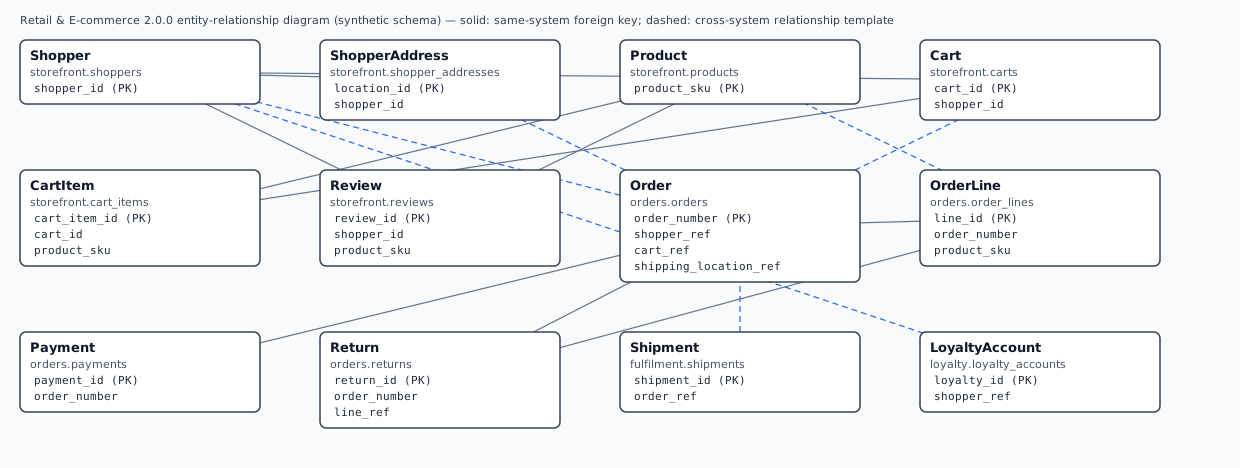
Industry pack: Retail & E-commerce — its entities, scenarios, policy templates and the complete asset bundle.
Try it with DataNivra
The synthetic playground walks through discovery, subsetting, masking, validation and certification in your browser, with no account. Starting free gives you the hosted synthetic sandbox; your own sources need an agent in your network.