Industry packs

Manufacturing industry pack

Synthetic plant-floor, supply-chain, quality and shipping test data with linked masking

Preview only · not activatable yet Version 2.1.0 · Complete

Everything on this page works without an account. Prefer a conversation? Request a demo (optional). Missing something? Request a feature.

This pack is installed and passes DataNivra’s pack conformance kit through the real engine, but it cannot be activated yet: no plan includes it yet, the standard agent image does not ship it, the control-plane catalogue does not list it and the hosted sandbox has no synthetic estate for it. You can explore its synthetic records, masking and scenarios on this page and in the browser demo. Tell us if you need it: demand decides which packs become activatable next.

Problems this pack solves

Masked data that still joins across 4 systems

8 cross-system relationships link logistics, plant, quality and supply; the pack's masking keeps one pseudonym per identity on every side. For example, plant.operators.operator_id and quality.inspections.inspector_ref get the same pseudonym.

The cases production samples rarely contain

9 ready-made scenarios generate them on demand, for example: breakdowns clustered within four days, most of them long stops; failed inspections sending work orders to rework; recalled lots and the shipments that carried them to customers.

Sensitive fields found and masked before anyone sees them

24 columns across 14 entities are classified (direct identifier, financial, PII, quasi identifier and sensitive) and covered by 3 masking templates you review and approve.

Evidence that each dataset is fit to use

2 certification presets check masking coverage, referential integrity, orphans and row counts before a dataset can be provisioned; a failed dataset is never provisioned.

Entities and relationships

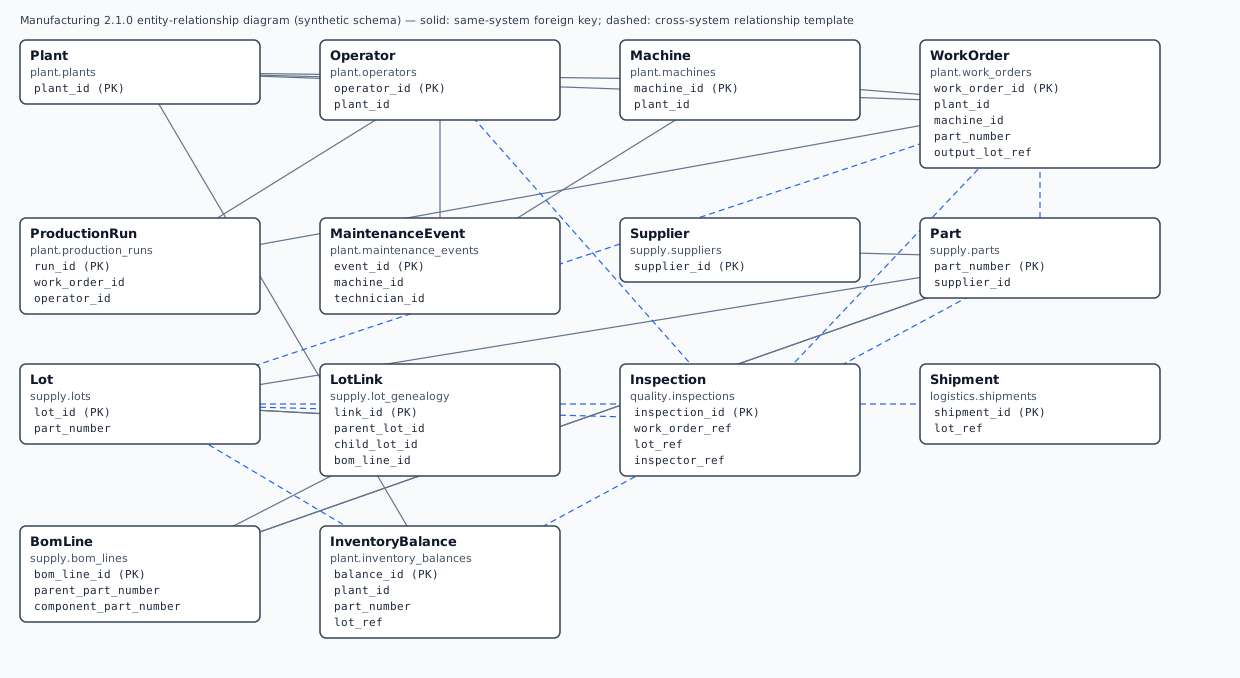
14 entities across 4 source systems, generated from the pack’s own entity model.

Entity graph of the Manufacturing pack14 entities in 4 systems (plant, supply, quality, logistics) linked by 24 relationships, 8 of them across systems. The table after the graph lists every relationship.plantsupplyqualitylogisticsPlant (plant.plants)Plantplant.plantsOperator (plant.operators)Operatorplant.operatorsMachine (plant.machines)Machineplant.machinesWorkOrder (plant.work_orders)WorkOrderplant.work_ordersProductionRun (plant.production_runs)ProductionRunplant.production_runsMaintenanceEvent (plant.maintenance_events)MaintenanceEventplant.maintenance_even…Supplier (supply.suppliers)Suppliersupply.suppliersPart (supply.parts)Partsupply.partsLot (supply.lots)Lotsupply.lotsLotLink (supply.lot_genealogy)LotLinksupply.lot_genealogyInspection (quality.inspections)Inspectionquality.inspectionsShipment (logistics.shipments)Shipmentlogistics.shipmentsBomLine (supply.bom_lines)BomLinesupply.bom_linesInventoryBalance (plant.inventory_balances)InventoryBalanceplant.inventory_balanc…
Arrows point from the referencing entity to the one it references. Solid: a foreign key inside one system. Dashed: a cross-system relationship — the pack keeps the same pseudonym on both sides, so masked data still joins.
All 24 relationships as a table
Relationships of the Manufacturing pack
EntityReferencesColumnsKind
OperatorPlantplant_id → plant_idWithin a system
MachinePlantplant_id → plant_idWithin a system
WorkOrderPlantplant_id → plant_idWithin a system
WorkOrderMachinemachine_id → machine_idWithin a system
ProductionRunWorkOrderwork_order_id → work_order_idWithin a system
MaintenanceEventMachinemachine_id → machine_idWithin a system
PartSuppliersupplier_id → supplier_idWithin a system
LotPartpart_number → part_numberWithin a system
LotLinkLotparent_lot_id → lot_idWithin a system
LotLinkLotchild_lot_id → lot_idWithin a system
LotLinkBomLinebom_line_id → bom_line_idWithin a system
BomLinePartparent_part_number → part_numberWithin a system
BomLinePartcomponent_part_number → part_numberWithin a system
InventoryBalancePlantplant_id → plant_idWithin a system
WorkOrderPartpart_number → part_numberAcross systems (pack relationship template)
WorkOrderLotoutput_lot_ref → lot_idAcross systems (pack relationship template)
ProductionRunOperatoroperator_id → operator_idWithin a system (pack relationship template)
MaintenanceEventOperatortechnician_id → operator_idWithin a system (pack relationship template)
InspectionWorkOrderwork_order_ref → work_order_idAcross systems (pack relationship template)
InspectionLotlot_ref → lot_idAcross systems (pack relationship template)
InspectionOperatorinspector_ref → operator_idAcross systems (pack relationship template)
ShipmentLotlot_ref → lot_idAcross systems (pack relationship template)
InventoryBalancePartpart_number → part_numberAcross systems (pack relationship template)
InventoryBalanceLotlot_ref → lot_idAcross systems (pack relationship template)

Realistic synthetic records

Synthetic data. Every record on this page is synthetic, generated from a fixed seed by the pack's own generator; masked values come from the real masking engine.

Operator — plant.operators (synthetic)
operator_id sensitiveplant_idbadge_number sensitivegiven_name sensitivefamily_name sensitiveemail sensitivephone sensitiveroleshifthired_on
OPR000000001PLT00001BDG-ZZ-983463JoetteUmberworthjoette.yarrridge3846@example.org—MACHINISTA2006-11-03
OPR000000002PLT00001BDG-ZZ-953927AlynDunton——INSPECTORB2020-09-06

Masking: before and after

Template Linked manufacturing test data (MFG_LINKED_TEST_DATA) applied to a synthetic Operator record from plant.operators.

Synthetic Operator record before and after masking
ColumnClassified asBefore (synthetic)After masking
operator_idDirect identifierOPR000000001OPR098977906
badge_numberPII, Direct identifierBDG-ZZ-983463YSO-BN-900882
given_namePII, Direct identifierJoetteFenette
family_namePII, Direct identifierUmberworthYarrholt
emailPII, Direct identifierjoette.yarrridge3846@example.orgyoren.zephby61@example.net
phonePII, Direct identifier—— (same value after masking)

Same pseudonym in two systems. The identifier OPR000000005 appears in plant.operators.operator_id and in quality.inspections.inspector_ref. Both become OPR344118740, so the masked systems still join (relationship MFG_INSPECTION_INSPECTOR).

Masked with a fixed public sample key so this example is reproducible; your data is masked with your own key, referenced from your secret store.

Synthetic scenarios you can run

11 runnable scenarios. Preview them in your browser without an account; the hosted sandbox opens when the pack becomes activatable.

Everyday production

Normal MFG_EVERYDAY_PRODUCTION

Ordinary work orders with production runs, inspections, maintenance and shipments

Everyday, valid records: the baseline most tests expect. Children per parent record: 1–3.

Preview in the browser demo: Everyday production

Downtime clusters

Rare MFG_DOWNTIME_CLUSTERS

Breakdowns clustered within four days, most of them long stops

Valid but uncommon business situations that production samples often miss. Children per parent record: 2–5.

Preview in the browser demo: Downtime clusters

Rework loops

Rare MFG_REWORK_LOOPS

Failed inspections sending work orders to rework

Valid but uncommon business situations that production samples often miss. Children per parent record: 2–4.

Preview in the browser demo: Rework loops

Lot recall

Rare MFG_LOT_RECALL

Recalled lots and the shipments that carried them to customers

Valid but uncommon business situations that production samples often miss. Children per parent record: 1–3.

Preview in the browser demo: Lot recall

Shift handovers

Rare MFG_SHIFT_HANDOVERS

Production runs starting exactly at shift changes, each with a handover note

Valid but uncommon business situations that production samples often miss. Children per parent record: 2–4.

Preview in the browser demo: Shift handovers

Tolerance limits

Boundary MFG_TOLERANCE_LIMITS

Measurements exactly on the tolerance limits (every other row) or just inside them

Values at the edges of valid ranges (limits, thresholds, extremes). Children per parent record: 1–3.

Preview in the browser demo: Tolerance limits

Supplier quality escape

Rare MFG_SUPPLIER_QUALITY_ESCAPE

Suppliers downgraded after quality escapes, with their lots quarantined

Valid but uncommon business situations that production samples often miss. Children per parent record: 1–3.

Preview in the browser demo: Supplier quality escape

Engineering changes

Rare MFG_ENGINEERING_CHANGES

Engineering changes: revision-A BOM lines closed the day before the change and revision-B lines effective from it, each under a change notice

Valid but uncommon business situations that production samples often miss. Children per parent record: 2–4.

Preview in the browser demo: Engineering changes

Inventory shortages

Boundary MFG_INVENTORY_SHORTAGES

Stock-outs holding work orders: more allocated than on hand (exactly one unit short on every fourth row) and negative on-hand booking errors

Values at the edges of valid ranges (limits, thresholds, extremes). Children per parent record: 1–3.

Preview in the browser demo: Inventory shortages

Duplicate measurements

Duplicate MFG_DUPLICATE_MEASUREMENTS

Inspection results recorded twice with identical content under new ids

Records that repeat others under new keys (clean-up and matching tests). Children per parent record: 2–4.

Preview in the browser demo: Duplicate measurements

Production histories

Historical MFG_PRODUCTION_HISTORIES

Multi-year, referentially intact production, quality and shipping histories without gaps

Old records for archive, migration and retention tests. Children per parent record: 2–4.

Preview in the browser demo: Production histories
Negative tests, kept apart. This scenario produces deliberately broken data for error handling and never passes certification as valid data:

  • MFG_BROKEN_REFERENCES — Dangling cross-system references and invalid values for error-handling tests

Sample schemas and representative outputs

The schema the pack expects in each system (also as CREATE TABLE DDL in the downloads). A run produces a masked or synthetic dataset with the same tables, a certification report with the gates of the chosen preset, and an evidence manifest with checksums — the rows stay in your environment.

Plant — plant.plants · 4 columns

A manufacturing site.

ColumnTypeRequiredSensitive classes
plant_id (key)VARCHAR(8)Yes—
plant_nameVARCHAR(64)Yes—
country_codeVARCHAR(2)Yes—
opened_onDATEYes—
Operator — plant.operators · 10 columns

A shop-floor employee: machinist, inspector, technician or supervisor.

ColumnTypeRequiredSensitive classes
operator_id (key)VARCHAR(12)YesDirect identifier
plant_idVARCHAR(8)Yes—
badge_numberVARCHAR(16)YesPII, Direct identifier
given_nameVARCHAR(64)YesPII, Direct identifier
family_nameVARCHAR(64)YesPII, Direct identifier
emailVARCHAR(128)NoPII, Direct identifier
phoneVARCHAR(32)NoPII, Direct identifier
roleVARCHAR(12)Yes—
shiftVARCHAR(1)Yes—
hired_onDATEYes—
Machine — plant.machines · 6 columns

A machine or piece of production equipment.

ColumnTypeRequiredSensitive classes
machine_id (key)VARCHAR(10)Yes—
plant_idVARCHAR(8)Yes—
machine_typeVARCHAR(16)Yes—
serial_numberVARCHAR(20)YesQuasi identifier
statusVARCHAR(8)Yes—
commissioned_onDATEYes—
WorkOrder — plant.work_orders · 10 columns

An order to produce a quantity of a part on a machine.

ColumnTypeRequiredSensitive classes
work_order_id (key)VARCHAR(12)Yes—
plant_idVARCHAR(8)Yes—
machine_idVARCHAR(10)Yes—
part_numberVARCHAR(12)Yes—
output_lot_refVARCHAR(12)Yes—
planned_qtyINTYes—
statusVARCHAR(12)Yes—
priorityVARCHAR(8)Yes—
created_atTIMESTAMPYes—
due_dateDATEYes—
ProductionRun — plant.production_runs · 9 columns

One shift's run on a work order by an operator.

ColumnTypeRequiredSensitive classes
run_id (key)BIGINTYes—
work_order_idVARCHAR(12)Yes—
operator_idVARCHAR(12)YesDirect identifier
shiftVARCHAR(1)Yes—
started_atTIMESTAMPYes—
ended_atTIMESTAMPYes—
good_qtyINTYes—
scrap_qtyINTYes—
handover_noteVARCHAR(400)NoSensitive
MaintenanceEvent — plant.maintenance_events · 7 columns

Preventive maintenance, a breakdown or a calibration of a machine.

ColumnTypeRequiredSensitive classes
event_id (key)BIGINTYes—
machine_idVARCHAR(10)Yes—
technician_idVARCHAR(12)YesDirect identifier
event_typeVARCHAR(12)Yes—
started_atTIMESTAMPYes—
downtime_minutesINTYes—
technician_notesVARCHAR(400)NoSensitive
Supplier — supply.suppliers · 9 columns

A supplier of raw materials and bought-in parts.

ColumnTypeRequiredSensitive classes
supplier_id (key)VARCHAR(10)Yes—
supplier_nameVARCHAR(64)Yes—
contact_nameVARCHAR(96)NoPII, Direct identifier
contact_emailVARCHAR(128)NoPII, Direct identifier
contact_phoneVARCHAR(32)NoPII, Direct identifier
supplier_ibanVARCHAR(34)YesFinancial, Direct identifier
country_codeVARCHAR(2)Yes—
quality_ratingVARCHAR(1)Yes—
approvedBOOLEANYes—
Part — supply.parts · 6 columns

A raw material or bought-in part (with a supplier) or a finished part made in-house.

ColumnTypeRequiredSensitive classes
part_number (key)VARCHAR(12)Yes—
supplier_idVARCHAR(10)No—
descriptionVARCHAR(96)Yes—
unit_costDECIMAL(12,2)YesFinancial
nominal_mmDOUBLEYes—
tolerance_mmDOUBLEYes—
Lot — supply.lots · 6 columns

A traceable quantity of one part: received from a supplier or produced by a work order (the demo subset root: its genealogy, work orders, inspections and shipments travel with it).

ColumnTypeRequiredSensitive classes
lot_id (key)VARCHAR(12)Yes—
part_numberVARCHAR(12)Yes—
originVARCHAR(8)Yes—
quantityINTYes—
statusVARCHAR(12)Yes—
created_onDATEYes—
LotLink — supply.lot_genealogy · 5 columns

Genealogy: a parent (input) lot consumed into a child (produced) lot.

ColumnTypeRequiredSensitive classes
link_id (key)BIGINTYes—
parent_lot_idVARCHAR(12)Yes—
child_lot_idVARCHAR(12)Yes—
quantity_usedINTYes—
bom_line_idBIGINTNo—
Inspection — quality.inspections · 11 columns

A measurement of a work order's output lot against the part's tolerance.

ColumnTypeRequiredSensitive classes
inspection_id (key)BIGINTYes—
work_order_refVARCHAR(12)Yes—
lot_refVARCHAR(12)Yes—
inspector_refVARCHAR(12)YesDirect identifier
characteristicVARCHAR(12)Yes—
nominal_mmDOUBLEYes—
tolerance_mmDOUBLEYes—
measured_mmDOUBLEYes—
resultVARCHAR(8)Yes—
inspected_atTIMESTAMPYes—
inspector_notesVARCHAR(400)NoSensitive
Shipment — logistics.shipments · 12 columns

A delivery of (part of) a produced lot to a customer site.

ColumnTypeRequiredSensitive classes
shipment_id (key)VARCHAR(12)Yes—
lot_refVARCHAR(12)Yes—
customer_accountVARCHAR(16)YesQuasi identifier
consignee_nameVARCHAR(96)NoPII, Direct identifier
consignee_phoneVARCHAR(32)NoPII, Direct identifier
delivery_streetVARCHAR(128)YesPII, Quasi identifier
delivery_cityVARCHAR(64)YesQuasi identifier
delivery_postal_codeVARCHAR(10)NoPII, Quasi identifier
quantityINTYes—
carrierVARCHAR(24)Yes—
statusVARCHAR(10)Yes—
shipped_onDATEYes—
BomLine — supply.bom_lines · 9 columns

One component line of a product's bill of materials: quantity per unit, by revision and effectivity (engineering changes close old lines and open new ones under a change notice).

ColumnTypeRequiredSensitive classes
bom_line_id (key)BIGINTYes—
parent_part_numberVARCHAR(12)Yes—
component_part_numberVARCHAR(12)Yes—
quantity_perDECIMAL(10,3)Yes—
unit_of_measureVARCHAR(4)Yes—
bom_revisionVARCHAR(2)Yes—
effective_fromDATEYes—
effective_toDATENo—
change_noticeVARCHAR(12)No—
InventoryBalance — plant.inventory_balances · 10 columns

Stock of one lot in a plant's storage bin: on hand, allocated to work orders, reorder point.

ColumnTypeRequiredSensitive classes
balance_id (key)BIGINTYes—
plant_idVARCHAR(8)Yes—
part_numberVARCHAR(12)Yes—
lot_refVARCHAR(12)Yes—
storage_binVARCHAR(12)Yes—
on_hand_qtyINTYes—
allocated_qtyINTYes—
reorder_pointINTYes—
stock_statusVARCHAR(10)Yes—
counted_atTIMESTAMPYes—

Compatible connectors

Verified with this pack version: PostgreSQL and Local files (Parquet / CSV). 17 more connectors are compatible by capability: they support what the pack needs, but have not been verified with this pack yet.

ConnectorStatus with Manufacturing
Local files (Parquet / CSV)Verified with this pack
PostgreSQLVerified with this pack
Amazon S3 / S3-compatible storageCompatible by capability (not yet verified with this pack)
Apache Kafka (connector in preview)Compatible by capability (not yet verified with this pack)
Azure Blob Storage / Data Lake StorageCompatible by capability (not yet verified with this pack)
DatabricksCompatible by capability (not yet verified with this pack)
Generic SQL (SQLAlchemy)Compatible by capability (not yet verified with this pack)
Google BigQueryCompatible by capability (not yet verified with this pack)
HTTP APIs (connector in preview)Compatible by capability (not yet verified with this pack)
IBM Db2 (connector in preview)Compatible by capability (not yet verified with this pack)
Mainframe files (EBCDIC / copybook) (connector in preview)Compatible by capability (not yet verified with this pack)
MariaDBCompatible by capability (not yet verified with this pack)
Microsoft SQL ServerCompatible by capability (not yet verified with this pack)
MongoDB (connector in preview)Compatible by capability (not yet verified with this pack)
MySQLCompatible by capability (not yet verified with this pack)
Oracle DatabaseCompatible by capability (not yet verified with this pack)
Parquet filesCompatible by capability (not yet verified with this pack)
SnowflakeCompatible by capability (not yet verified with this pack)
SQLite (developer evaluation) (connector in preview)Compatible by capability (not yet verified with this pack)

Prerequisites and expected setup effort

You need

  • This pack is not in any plan yet.
  • One DataNivra agent inside your network (outbound HTTPS only) that ships Manufacturing 2.1.0.
  • Read-only access to a compatible source (verified with this pack: PostgreSQL, Local files (Parquet / CSV)).
  • A non-production target environment the agent may write test data to.
  • A masking key in your own secret store, referenced as vault://…, azure-kv://… or env://… (DataNivra only ever sees the reference).
  • For production sources, a second person who approves policies (separation of duties).

A DataNivra agent that reports its installed industry packs (releases after agent 0.3.0); the control plane runs a pack job only on an agent holding the exact active pack version with the catalogued integrity digest.

Expected setup effort (estimates)

StepEstimate
Try the synthetic sandbox
No install: sign up and open the sandbox.
Minutes (estimate)
Install (or reuse) the agent
One Docker command or a Helm chart; outbound HTTPS only.
Under an hour (estimate)
Connect a source
Register a read-only source through the existing connector workflow.
Under an hour (estimate)
Review and approve policies
Create drafts from the Manufacturing templates, review and approve them.
Under an hour (estimate)
First certified dataset
Run the first job; certification and evidence are produced automatically.
Minutes (estimate)

Certification presets in plain language

MFG_STRICT

Every gate; full masking coverage; zero orphaned runs, inspections, lots, genealogy links or shipments; exact row counts. Default for masked manufacturing test data.

  • Masking coverage of at least 100% of sensitive columns
  • No orphaned child records
  • Empty-value ratio may rise by at most 5%
  • Row counts must match exactly
16 gates it requires
  • POLICY_COVERAGE: every sensitive column is covered by an approved policy
  • MASKING_COMPLETION: masking finished on every covered column
  • REFERENTIAL_INTEGRITY: every reference still points at an existing record
  • SCHEMA_VALIDATION: the output schema matches the source schema
  • DATA_QUALITY: empty-value ratios stay within the preset’s drift limit
  • ROW_COUNT_RECONCILIATION: row counts match the plan within the tolerance
  • ORPHAN_DETECTION: no child record lost its parent
  • PROVENANCE: every row is tagged masked or synthetic
  • MANIFEST: a manifest lists every output table with checksums
  • POLICY_VERSION: the exact approved policy versions are recorded
  • ENGINE_VERSION: the engine version is recorded
  • CHECKSUMS: output checksums are recorded for later verification
  • IDENTITY_CONSISTENCY: linked identifiers got the same pseudonym in every system
  • SOURCE_READ_ONLY: the source was only read, never written
  • EGRESS_GUARD: no row-level data left the agent
  • CONNECTOR_HEALTH: the connectors stayed healthy during the run

MFG_SCENARIO_TESTING

Every gate, with slightly relaxed NULL-ratio drift for scenario datasets whose states (cancelled orders, quarantined lots, runs without notes) leave optional fields empty.

  • Masking coverage of at least 100% of sensitive columns
  • No orphaned child records
  • Empty-value ratio may rise by at most 15%
  • Row counts must match exactly
16 gates it requires
  • POLICY_COVERAGE: every sensitive column is covered by an approved policy
  • MASKING_COMPLETION: masking finished on every covered column
  • REFERENTIAL_INTEGRITY: every reference still points at an existing record
  • SCHEMA_VALIDATION: the output schema matches the source schema
  • DATA_QUALITY: empty-value ratios stay within the preset’s drift limit
  • ROW_COUNT_RECONCILIATION: row counts match the plan within the tolerance
  • ORPHAN_DETECTION: no child record lost its parent
  • PROVENANCE: every row is tagged masked or synthetic
  • MANIFEST: a manifest lists every output table with checksums
  • POLICY_VERSION: the exact approved policy versions are recorded
  • ENGINE_VERSION: the engine version is recorded
  • CHECKSUMS: output checksums are recorded for later verification
  • IDENTITY_CONSISTENCY: linked identifiers got the same pseudonym in every system
  • SOURCE_READ_ONLY: the source was only read, never written
  • EGRESS_GUARD: no row-level data left the agent
  • CONNECTOR_HEALTH: the connectors stayed healthy during the run

Activation status

What is missing before you can activate the Manufacturing pack yourself:

  • no plan includes it yet
  • the standard agent image does not ship it
  • the control-plane catalogue does not list it
  • the hosted sandbox has no synthetic estate for it

Until then, preview it in the browser demo and download its synthetic asset bundle below.

Tell us you need the Manufacturing pack or request a feature for it.

Downloads

Version 2.1.0, 73 files (212.6 KB), all synthetic and generated from the pack itself. Every file’s SHA-256 is listed in MANIFEST.json.

Start here (2)
Entity–relationship diagram (2)
Sample schemas (5)
Policy templates (9)
API, CLI, SDK and CI/CD examples (10)
Synthetic sample data (CSV, JSON, Parquet) (43)

Troubleshooting

The reason codes you can meet on the way, with the recovery step. Every code is also in the error-code catalog.

SANDBOX_PACK_NOT_OFFERED — Synthetic estate not offered
A requested synthetic estate (industry pack) is not available in the hosted sandbox. What to do: Start the sandbox with the default estates.
ENTITLEMENT_REQUIRED — Plan does not include this
Your plan does not include this feature or industry pack. What to do: Upgrade in Billing & Plan.
PACK_INTEGRITY_UNVERIFIED — Pack integrity not verified
This pack version was registered without an integrity digest, so it cannot be activated (fail closed). What to do: Ask your operator to re-register the pack catalogue with the current control-plane image (register-pack), then activate again.
PACK_DEPENDENCY_INACTIVE — Required pack not active
This pack depends on another industry pack that is not active for your organization. What to do: Activate the packs this pack depends on first, then activate it again.
AGENT_PACK_MISSING — No agent can run this industry pack
The job's agent does not report the pack (older agents report no packs at all), so the job was not sent. What to do: Upgrade the agent to a release that reports its installed packs and ships this pack, then run the request again.
AGENT_PACK_VERSION_INCOMPATIBLE — Industry pack version differs on the agent
The agent holds a different version of the pack than the one the job was approved for. What to do: Deploy an agent with the pack's active version, or roll the pack back in Industry packs.
AGENT_PACK_INTEGRITY_MISMATCH — Agent pack differs from the catalogue
The agent reports the pack's version with a different integrity digest than the catalogued one, so the job was not sent. What to do: Redeploy the agent from the official signed image for this release, then run the request again.
PACK_TEMPLATES_UNAVAILABLE — Pack templates not registered
This pack version was registered without its policy templates. What to do: Ask your operator to re-register the pack catalogue (register-pack); create policies manually meanwhile.
PACK_TEMPLATE_KEY_REF_REQUIRED — Masking key reference required
A selected template keeps identities linked across systems and needs your masking key reference. What to do: Provide key_ref, e.g. vault://your-vault/tdm-masking-key, then create the drafts again.
PACK_NOT_ENABLED — Industry pack not enabled
The industry pack is not enabled for this tenant. What to do: Enable the pack (if your plan includes it).

Frequently asked questions

Are the Manufacturing records on this page real?
No. Every record on this page is synthetic, generated from a fixed seed by the pack's own generator; masked values come from the real masking engine. The masking example uses a fixed public sample key; your own data is masked with a key from your secret store.
Can I activate the Manufacturing pack myself?
This pack is installed and passes DataNivra’s pack conformance kit through the real engine, but it cannot be activated yet: no plan includes it yet, the standard agent image does not ship it, the control-plane catalogue does not list it and the hosted sandbox has no synthetic estate for it. You can explore its synthetic records, masking and scenarios on this page and in the browser demo. Tell us if you need it: demand decides which packs become activatable next.
Which databases and files does the Manufacturing pack work with?
Verified with this pack version: PostgreSQL and Local files (Parquet / CSV). 17 more connectors are compatible by capability: they support what the pack needs, but have not been verified with this pack yet.
How long does a first certified Manufacturing dataset take?
Estimates, not guarantees — try the synthetic sandbox: minutes; install (or reuse) the agent: under an hour; connect a source: under an hour; review and approve policies: under an hour; first certified dataset: minutes.
Which test scenarios does the Manufacturing pack include?
11 runnable scenarios (everyday production, downtime clusters, rework loops, lot recall and more), plus 1 negative-test scenario kept apart from valid data.
Do Manufacturing rows leave my network?
No. The DataNivra agent runs inside your environment: it reads the source, masks, subsets, generates and certifies there, and sends only metadata, aggregate counts and evidence to the DataNivra control plane (customer-resident processing, zero raw-production-data egress).

Learn the concepts, then come back to activate

Regulatory context

The Manufacturing pack supports privacy and data-minimisation practices by keeping personal data inside your environment; it does not, by itself, establish compliance with any law or regulation.

Everything on this page works without an account. Prefer a conversation? Request a demo (optional). Missing something? Request a feature.