Industry packs

Government and Public Sector industry pack

Synthetic resident, casework, benefits and licensing test data with linked masking

Synthetic resident, casework, benefits and licensing test data with linked masking

Fully self-service (journey proven end to end) Version 2.1.0 · Available in paid plans

The full Government and Public Sector 2.1.0 journey — from the public pack page through the synthetic sandbox, signup, activation, agent and source setup, scenario, masking and subsetting, certification and provisioning to evidence export — was verified end to end on a local real-component stack (the real control plane, agent, engine, sandbox runner, website and console built from source, with synthetic data) on 2026-10-17. Published agents 0.6.1, 0.6.0, 0.5.0, 0.4.4, 0.4.3, 0.4.2, 0.4.1 and 0.4.0 run this pack version.

No call and no credit card needed. Prefer a conversation? Request a demo (optional). Missing something? Request a feature.

Four fluted stone columns on the facade of a classical public building, in black and white

Included in Free, Pro Trial, Team, Business, Enterprise and Private Cloud / Self-Hosted. You can activate it for your organization yourself in the console; no call is needed.

Problems this pack solves

Masked data that still joins across 4 systems

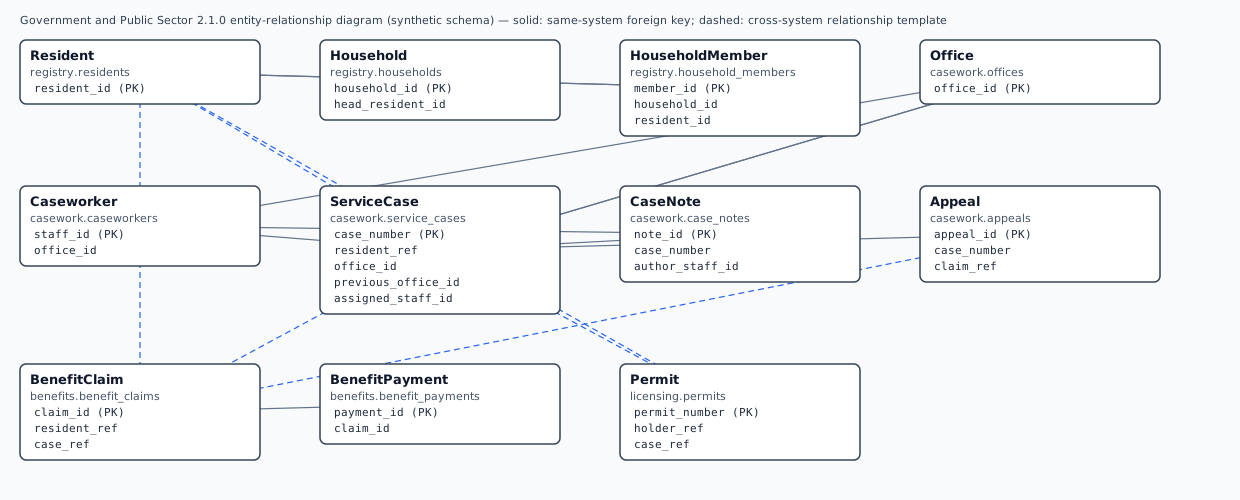
6 cross-system relationships link benefits, casework, licensing and registry; the pack's masking keeps one pseudonym per identity on every side. For example, registry.residents.resident_id and casework.service_cases.resident_ref get the same pseudonym.

The cases production samples rarely contain

7 ready-made scenarios generate them on demand, for example: benefit overpayments being recovered through negative recovery payments; service cases transferred from one office to another; permits and licences past their expiry date.

Sensitive fields found and masked before anyone sees them

43 columns across 11 entities are classified (direct identifier, financial, PHI, PII, quasi identifier and sensitive) and covered by 3 masking templates you review and approve.

Evidence that each dataset is fit to use

2 certification presets check masking coverage, referential integrity, orphans and row counts before a dataset can be provisioned; a failed dataset is never provisioned.

Entities and relationships

11 entities across 4 source systems, generated from the pack’s own entity model.

Entity graph of the Government and Public Sector pack11 entities in 4 systems (registry, casework, benefits, licensing) linked by 17 relationships, 6 of them across systems. The table after the graph lists every relationship.registrycaseworkbenefitslicensingResident (registry.residents)Residentregistry.residentsHousehold (registry.households)Householdregistry.householdsHouseholdMember (registry.household_members)HouseholdMemberregistry.household_mem…Office (casework.offices)Officecasework.officesCaseworker (casework.caseworkers)Caseworkercasework.caseworkersServiceCase (casework.service_cases)ServiceCasecasework.service_casesCaseNote (casework.case_notes)CaseNotecasework.case_notesAppeal (casework.appeals)Appealcasework.appealsBenefitClaim (benefits.benefit_claims)BenefitClaimbenefits.benefit_claimsBenefitPayment (benefits.benefit_payments)BenefitPaymentbenefits.benefit_payme…Permit (licensing.permits)Permitlicensing.permits
Arrows point from the referencing entity to the one it references. Solid: a foreign key inside one system. Dashed: a cross-system relationship — the pack keeps the same pseudonym on both sides, so masked data still joins.
All 17 relationships as a table
Relationships of the Government and Public Sector pack
EntityReferencesColumnsKind
HouseholdResidenthead_resident_id → resident_idWithin a system
HouseholdMemberHouseholdhousehold_id → household_idWithin a system
HouseholdMemberResidentresident_id → resident_idWithin a system
CaseworkerOfficeoffice_id → office_idWithin a system
ServiceCaseOfficeoffice_id → office_idWithin a system
ServiceCaseOfficeprevious_office_id → office_idWithin a system
CaseNoteServiceCasecase_number → case_numberWithin a system
CaseNoteCaseworkerauthor_staff_id → staff_idWithin a system
AppealServiceCasecase_number → case_numberWithin a system
BenefitPaymentBenefitClaimclaim_id → claim_idWithin a system
ServiceCaseResidentresident_ref → resident_idAcross systems (pack relationship template)
ServiceCaseCaseworkerassigned_staff_id → staff_idWithin a system (pack relationship template)
BenefitClaimResidentresident_ref → resident_idAcross systems (pack relationship template)
BenefitClaimServiceCasecase_ref → case_numberAcross systems (pack relationship template)
AppealBenefitClaimclaim_ref → claim_idAcross systems (pack relationship template)
PermitResidentholder_ref → resident_idAcross systems (pack relationship template)
PermitServiceCasecase_ref → case_numberAcross systems (pack relationship template)

Realistic synthetic records

Synthetic data. Every record on this page is synthetic, generated from a fixed seed by the pack's own generator; masked values come from the real masking engine.

Resident — registry.residents (synthetic)
resident_id sensitivegiven_name sensitivefamily_name sensitivebirth_date sensitivenational_id sensitiveemail sensitivephone sensitivestreet_address sensitivecity sensitivepostal_code sensitivecountry_coderegistered_onregistration_status
RES000000001NeraraYarrton1999-12-26NID-ZZ-1522651nerara.stowbrook1938@example.net555-038-27197716 Zephyrine AvenueAldrenhaven35483ZZ2017-10-02ACTIVE
RES000000002IrricYarrton1973-01-14NID-ZZ-8105697irric.fairwick2049@example.com555-049-94207716 Zephyrine AvenueAldrenhaven35483ZZ2015-05-02ACTIVE

Masking: before and after

Template Linked public-service test data (GOV_LINKED_TEST_DATA) applied to a synthetic Resident record from registry.residents.

Synthetic Resident record before and after masking
ColumnClassified asBefore (synthetic)After masking
resident_idDirect identifierRES000000001RES098977906
given_namePII, Direct identifierNeraraHesira
family_namePII, Direct identifierYarrtonStowby
birth_datePII, Quasi identifier1999-12-261999-11-11
national_idPII, Direct identifierNID-ZZ-1522651NND-GL-3350341
emailPII, Direct identifiernerara.stowbrook1938@example.netrosyn.rookfield4185@example.net
phonePII, Direct identifier555-038-2719555-023-8784
street_addressPII, Quasi identifier7716 Zephyrine Avenue5161 Juniperwell Lane
cityQuasi identifierAldrenhavenNeskton
postal_codePII, Quasi identifier3548378583

Same pseudonym in two systems. The identifier RES000000001 appears in registry.residents.resident_id and in casework.service_cases.resident_ref. Both become RES098977906, so the masked systems still join (relationship GOV_CASE_RESIDENT).

Masked with a fixed public sample key so this example is reproducible; your data is masked with your own key, referenced from your secret store.

Synthetic scenarios you can run

9 runnable scenarios. Run any of them in the hosted synthetic sandbox, or preview them in your browser without an account.

Negative tests, kept apart. This scenario produces deliberately broken data for error handling and never passes certification as valid data:

  • GOV_BROKEN_REFERENCES — Dangling cross-system references and invalid values for error-handling tests

Sample schemas and representative outputs

The schema the pack expects in each system (also as CREATE TABLE DDL in the downloads). A run produces a masked or synthetic dataset with the same tables, a certification report with the gates of the chosen preset, and an evidence manifest with checksums — the rows stay in your environment.

Resident — registry.residents · 13 columns

A person on the population or service register (the natural subset root).

ColumnTypeRequiredSensitive classes
resident_id (key)VARCHAR(12)YesDirect identifier
given_nameVARCHAR(64)YesPII, Direct identifier
family_nameVARCHAR(64)YesPII, Direct identifier
birth_dateDATENoPII, Quasi identifier
national_idVARCHAR(16)NoPII, Direct identifier
emailVARCHAR(128)NoPII, Direct identifier
phoneVARCHAR(32)NoPII, Direct identifier
street_addressVARCHAR(128)NoPII, Quasi identifier
cityVARCHAR(64)NoQuasi identifier
postal_codeVARCHAR(10)NoPII, Quasi identifier
country_codeVARCHAR(2)Yes—
registered_onDATEYes—
registration_statusVARCHAR(20)Yes—
Household — registry.households · 7 columns

A household at one address, headed by a resident.

ColumnTypeRequiredSensitive classes
household_id (key)VARCHAR(12)YesDirect identifier
head_resident_idVARCHAR(12)YesDirect identifier
street_addressVARCHAR(128)NoPII, Quasi identifier
cityVARCHAR(64)NoQuasi identifier
postal_codeVARCHAR(10)NoPII, Quasi identifier
household_sizeINTYes—
tenureVARCHAR(16)Yes—
HouseholdMember — registry.household_members · 5 columns

Membership of a resident in a household.

ColumnTypeRequiredSensitive classes
member_id (key)BIGINTYes—
household_idVARCHAR(12)YesDirect identifier
resident_idVARCHAR(12)YesDirect identifier
relationshipVARCHAR(16)Yes—
joined_onDATEYes—
Office — casework.offices · 3 columns

A public-service office (reference data; invented names).

ColumnTypeRequiredSensitive classes
office_id (key)VARCHAR(8)Yes—
office_nameVARCHAR(64)Yes—
regionVARCHAR(12)Yes—
Caseworker — casework.caseworkers · 5 columns

A member of staff who handles service cases at an office.

ColumnTypeRequiredSensitive classes
staff_id (key)VARCHAR(10)YesDirect identifier
caseworker_nameVARCHAR(96)YesPII, Direct identifier
emailVARCHAR(128)NoPII, Direct identifier
office_idVARCHAR(8)Yes—
roleVARCHAR(16)Yes—
ServiceCase — casework.service_cases · 10 columns

A request or case handled for a resident, possibly transferred between offices.

ColumnTypeRequiredSensitive classes
case_number (key)VARCHAR(12)YesDirect identifier
resident_refVARCHAR(12)YesDirect identifier
office_idVARCHAR(8)Yes—
previous_office_idVARCHAR(8)No—
assigned_staff_idVARCHAR(10)YesDirect identifier
case_typeVARCHAR(16)Yes—
statusVARCHAR(18)Yes—
priorityVARCHAR(8)Yes—
opened_onDATEYes—
closed_onDATENo—
CaseNote — casework.case_notes · 6 columns

A caseworker's note on a case (free text that can mention people and circumstances).

ColumnTypeRequiredSensitive classes
note_id (key)BIGINTYes—
case_numberVARCHAR(12)YesDirect identifier
author_staff_idVARCHAR(10)YesDirect identifier
written_atTIMESTAMPYes—
note_typeVARCHAR(12)Yes—
note_textVARCHAR(600)NoSensitive
Appeal — casework.appeals · 7 columns

An appeal against a benefit decision, heard within the case.

ColumnTypeRequiredSensitive classes
appeal_id (key)BIGINTYes—
case_numberVARCHAR(12)YesDirect identifier
claim_refVARCHAR(12)YesDirect identifier
lodged_onDATEYes—
hearing_dateDATENo—
outcomeVARCHAR(12)Yes—
grounds_textVARCHAR(400)NoSensitive
BenefitClaim — benefits.benefit_claims · 9 columns

A claim for a benefit and its eligibility decision.

ColumnTypeRequiredSensitive classes
claim_id (key)VARCHAR(12)YesDirect identifier
resident_refVARCHAR(12)YesDirect identifier
case_refVARCHAR(12)YesDirect identifier
benefit_typeVARCHAR(20)Yes—
declared_monthly_incomeDECIMAL(12,2)YesFinancial
eligibility_decisionVARCHAR(12)Yes—
decided_onDATENo—
monthly_awardDECIMAL(12,2)YesFinancial
disability_detailsVARCHAR(300)NoPHI, Sensitive
BenefitPayment — benefits.benefit_payments · 8 columns

A payment on a benefit claim, or a recovery of an overpayment (negative amount).

ColumnTypeRequiredSensitive classes
payment_id (key)BIGINTYes—
claim_idVARCHAR(12)YesDirect identifier
paid_onDATEYes—
amountDECIMAL(12,2)YesFinancial
payment_kindVARCHAR(24)Yes—
payee_ibanVARCHAR(34)NoFinancial, Direct identifier
payment_referenceVARCHAR(20)YesFinancial, Direct identifier
statusVARCHAR(12)Yes—
Permit — licensing.permits · 8 columns

A permit or licence issued to a resident after an application case.

ColumnTypeRequiredSensitive classes
permit_number (key)VARCHAR(12)YesDirect identifier
holder_refVARCHAR(12)YesDirect identifier
case_refVARCHAR(12)YesDirect identifier
permit_typeVARCHAR(16)Yes—
site_addressVARCHAR(128)NoPII, Quasi identifier
issued_onDATEYes—
expires_onDATEYes—
statusVARCHAR(12)Yes—

Compatible connectors

Verified with this pack version: PostgreSQL and Local files (Parquet / CSV). 25 more connectors are verified on their real engines and managed services.

ConnectorStatus with Government and Public Sector
Local files (Parquet / CSV)Verified with this pack
PostgreSQLVerified with this pack
Amazon DynamoDBVerified connector
Amazon RedshiftVerified connector
Amazon S3 / S3-compatible storageVerified connector
Apache KafkaVerified connector
Azure Blob Storage / Data Lake StorageVerified connector
Azure Cosmos DBVerified connector
Azure Synapse AnalyticsVerified connector
CockroachDBVerified connector
DatabricksVerified connector
Generic SQL (SQLAlchemy)Verified connector
Google BigQueryVerified connector
HTTP APIsVerified connector
IBM Db2Verified connector
IBM InformixVerified connector
Mainframe files (EBCDIC / copybook)Verified connector
MariaDBVerified connector
Microsoft SQL ServerVerified connector
MongoDBVerified connector
MySQLVerified connector
Oracle DatabaseVerified connector
Parquet filesVerified connector
SalesforceVerified connector
ServiceNowVerified connector
SnowflakeVerified connector
SQLite (developer evaluation)Verified connector

Prerequisites and expected setup effort

You need

  • A DataNivra account; the Free Trial includes this pack.
  • One DataNivra agent inside your network (outbound HTTPS only) that ships Government and Public Sector 2.1.0.
  • Read-only access to a compatible source (verified with this pack: PostgreSQL, Local files (Parquet / CSV)).
  • A non-production target environment the agent may write test data to.
  • A masking key in your own secret store, referenced as vault://…, azure-kv://… or env://… (DataNivra only ever sees the reference).
  • For production sources, a second person who approves policies (separation of duties).

A DataNivra agent that reports its installed industry packs (releases after agent 0.3.0); the control plane runs a pack job only on an agent holding the exact active pack version with the catalogued integrity digest.

Expected setup effort (estimates)

StepEstimate
Try the synthetic sandbox
No install: sign up and open the sandbox.
Minutes (estimate)
Install (or reuse) the agent
One Docker command or a Helm chart; outbound HTTPS only.
Under an hour (estimate)
Connect a source
Register a read-only source through the existing connector workflow.
Under an hour (estimate)
Review and approve policies
Create drafts from the Government and Public Sector templates, review and approve them.
Under an hour (estimate)
First certified dataset
Run the first job; certification and evidence are produced automatically.
Minutes (estimate)

Certification presets in plain language

GOV_STRICT

Every gate; full masking coverage; zero orphaned households, cases, notes, appeals, claims, payments or permits; exact row counts. Default for masked public-service test data.

  • Masking coverage of at least 100% of sensitive columns
  • No orphaned child records
  • Empty-value ratio may rise by at most 5%
  • Row counts must match exactly
16 gates it requires
  • POLICY_COVERAGE: every sensitive column is covered by an approved policy
  • MASKING_COMPLETION: masking finished on every covered column
  • REFERENTIAL_INTEGRITY: every reference still points at an existing record
  • SCHEMA_VALIDATION: the output schema matches the source schema
  • DATA_QUALITY: empty-value ratios stay within the preset’s drift limit
  • ROW_COUNT_RECONCILIATION: row counts match the plan within the tolerance
  • ORPHAN_DETECTION: no child record lost its parent
  • PROVENANCE: every row is tagged masked or synthetic
  • MANIFEST: a manifest lists every output table with checksums
  • POLICY_VERSION: the exact approved policy versions are recorded
  • ENGINE_VERSION: the engine version is recorded
  • CHECKSUMS: output checksums are recorded for later verification
  • IDENTITY_CONSISTENCY: linked identifiers got the same pseudonym in every system
  • SOURCE_READ_ONLY: the source was only read, never written
  • EGRESS_GUARD: no row-level data left the agent
  • CONNECTOR_HEALTH: the connectors stayed healthy during the run

GOV_SCENARIO_TESTING

Every gate, with slightly relaxed NULL-ratio drift for scenario datasets whose business states (open cases, pending decisions, unscheduled hearings) leave optional fields empty.

  • Masking coverage of at least 100% of sensitive columns
  • No orphaned child records
  • Empty-value ratio may rise by at most 15%
  • Row counts must match exactly
16 gates it requires
  • POLICY_COVERAGE: every sensitive column is covered by an approved policy
  • MASKING_COMPLETION: masking finished on every covered column
  • REFERENTIAL_INTEGRITY: every reference still points at an existing record
  • SCHEMA_VALIDATION: the output schema matches the source schema
  • DATA_QUALITY: empty-value ratios stay within the preset’s drift limit
  • ROW_COUNT_RECONCILIATION: row counts match the plan within the tolerance
  • ORPHAN_DETECTION: no child record lost its parent
  • PROVENANCE: every row is tagged masked or synthetic
  • MANIFEST: a manifest lists every output table with checksums
  • POLICY_VERSION: the exact approved policy versions are recorded
  • ENGINE_VERSION: the engine version is recorded
  • CHECKSUMS: output checksums are recorded for later verification
  • IDENTITY_CONSISTENCY: linked identifiers got the same pseudonym in every system
  • SOURCE_READ_ONLY: the source was only read, never written
  • EGRESS_GUARD: no row-level data left the agent
  • CONNECTOR_HEALTH: the connectors stayed healthy during the run

Activate it and create your first certified dataset

Seven steps in the console, each linked below. Nothing needs DataNivra staff.

  1. Activate the pack for your organization

    Activation checks your plan, the pack's integrity digest and its dependencies, then enables Government and Public Sector 2.1.0.

    Open pack activation in the console

  2. Install or reuse your agent

    One agent runs every pack you activate; it must report this pack version. Upgrade it if it does not.

    Install the agent in the console

  3. Connect a compatible source

    Start with a connector verified with this pack: PostgreSQL, Local files (Parquet / CSV).

    Connect a source in the console

  4. Create policies from the pack templates

    Create drafts from Linked public-service test data, Unlinked public-service analytics extract, Linked test data without free text or health details; a second person approves them (separation of duties).

    Create policies from templates in the console

  5. Request your first dataset

    Choose a scenario such as Everyday services (GOV_EVERYDAY_SERVICES), the subset size and relationship closure.

    Request a dataset in the console

  6. Certify

    The run is certified against a preset such as GOV_STRICT; a failed dataset is never provisioned.

    See certification evidence in the console

  7. Provision and keep the evidence

    Provision the certified dataset to a non-production target, download the evidence and schedule refreshes.

    Provision the dataset in the console

Downloads

Version 2.1.0, 64 files (184.0 KB), all synthetic and generated from the pack itself. Every file’s SHA-256 is listed in MANIFEST.json.

Start here (2)
Entity–relationship diagram (2)
Sample schemas (5)
Policy templates (9)
API, CLI, SDK and CI/CD examples (10)
Synthetic sample data (CSV, JSON, Parquet) (34)

Troubleshooting

The reason codes you can meet on the way, with the recovery step. Every code is also in the error-code catalog.

SANDBOX_PACK_NOT_OFFERED — Synthetic estate not offered
A requested synthetic estate (industry pack) is not available in the hosted sandbox. What to do: Start the sandbox with the default estates.
ENTITLEMENT_REQUIRED — Plan does not include this
Your plan does not include this feature or industry pack. What to do: Upgrade in Billing & Plan.
PACK_INTEGRITY_UNVERIFIED — Pack integrity not verified
This pack version was registered without an integrity digest, so it cannot be activated (fail closed). What to do: Ask your operator to re-register the pack catalogue with the current control-plane image (register-pack), then activate again.
PACK_DEPENDENCY_INACTIVE — Required pack not active
This pack depends on another industry pack that is not active for your organization. What to do: Activate the packs this pack depends on first, then activate it again.
AGENT_PACK_MISSING — No agent can run this industry pack
The job's agent does not report the pack (older agents report no packs at all), so the job was not sent. What to do: Upgrade the agent to a release that reports its installed packs and ships this pack, then run the request again.
AGENT_PACK_VERSION_INCOMPATIBLE — Industry pack version differs on the agent
The agent holds a different version of the pack than the one the job was approved for. What to do: Deploy an agent with the pack's active version, or roll the pack back in Industry packs.
AGENT_PACK_INTEGRITY_MISMATCH — Agent pack differs from the catalogue
The agent reports the pack's version with a different integrity digest than the catalogued one, so the job was not sent. What to do: Redeploy the agent from the official signed image for this release, then run the request again.
PACK_TEMPLATES_UNAVAILABLE — Pack templates not registered
This pack version was registered without its policy templates. What to do: Ask your operator to re-register the pack catalogue (register-pack); create policies manually meanwhile.
PACK_TEMPLATE_KEY_REF_REQUIRED — Masking key reference required
A selected template keeps identities linked across systems and needs your masking key reference. What to do: Provide key_ref, e.g. vault://your-vault/tdm-masking-key, then create the drafts again.
PACK_NOT_ENABLED — Industry pack not enabled
The industry pack is not enabled for this tenant. What to do: Enable the pack (if your plan includes it).

Frequently asked questions

Are the Government and Public Sector records on this page real?
No. Every record on this page is synthetic, generated from a fixed seed by the pack's own generator; masked values come from the real masking engine. The masking example uses a fixed public sample key; your own data is masked with a key from your secret store.
Can I activate the Government and Public Sector pack myself?
Included in Free, Pro Trial, Team, Business, Enterprise and Private Cloud / Self-Hosted. You can activate it for your organization yourself in the console; no call is needed.
Which databases and files does the Government and Public Sector pack work with?
Verified with this pack version: PostgreSQL and Local files (Parquet / CSV). 25 more connectors are verified on their real engines and managed services.
How long does a first certified Government and Public Sector dataset take?
Estimates, not guarantees — try the synthetic sandbox: minutes; install (or reuse) the agent: under an hour; connect a source: under an hour; review and approve policies: under an hour; first certified dataset: minutes.
Which test scenarios does the Government and Public Sector pack include?
9 runnable scenarios (everyday services, overpayment recoveries, office transfers, expired permits and more), plus 1 negative-test scenario kept apart from valid data.
Do Government and Public Sector rows leave my network?
No. The DataNivra agent runs inside your environment: it reads the source, masks, subsets, generates and certifies there, and sends only metadata, aggregate counts and evidence to the DataNivra control plane (customer-resident processing, zero raw-production-data egress).

Learn the concepts, then come back to activate

Regulatory context

The Government and Public Sector pack covers data that laws and industry rules often treat as sensitive. It supports your privacy and governance programmes by keeping those records inside your environment and producing certification evidence; it does not, by itself, make any system or organisation compliant with any law, regulation or standard.

No call and no credit card needed. Prefer a conversation? Request a demo (optional). Missing something? Request a feature.